
Vehicle spreadsheet import guide
How to import a vehicle spreadsheet without silently overwriting fleet identity.
A bulk vehicle import should be a review workflow, not a blind database upsert. This guide explains how Crew Keys separates parsing, validation, discrepancy review, selection, and transaction commit so VIN and Vehicle ID conflicts are visible before anything changes.
Crew Keys example
Review creates, updates, unchanged rows, and identity conflicts before commit.
Crew Keys accepts common spreadsheet formats, identifies the actual header row, preserves omitted fields on updates, and requires revalidation after edits.
Actual Crew Keys interface · fictional demonstration data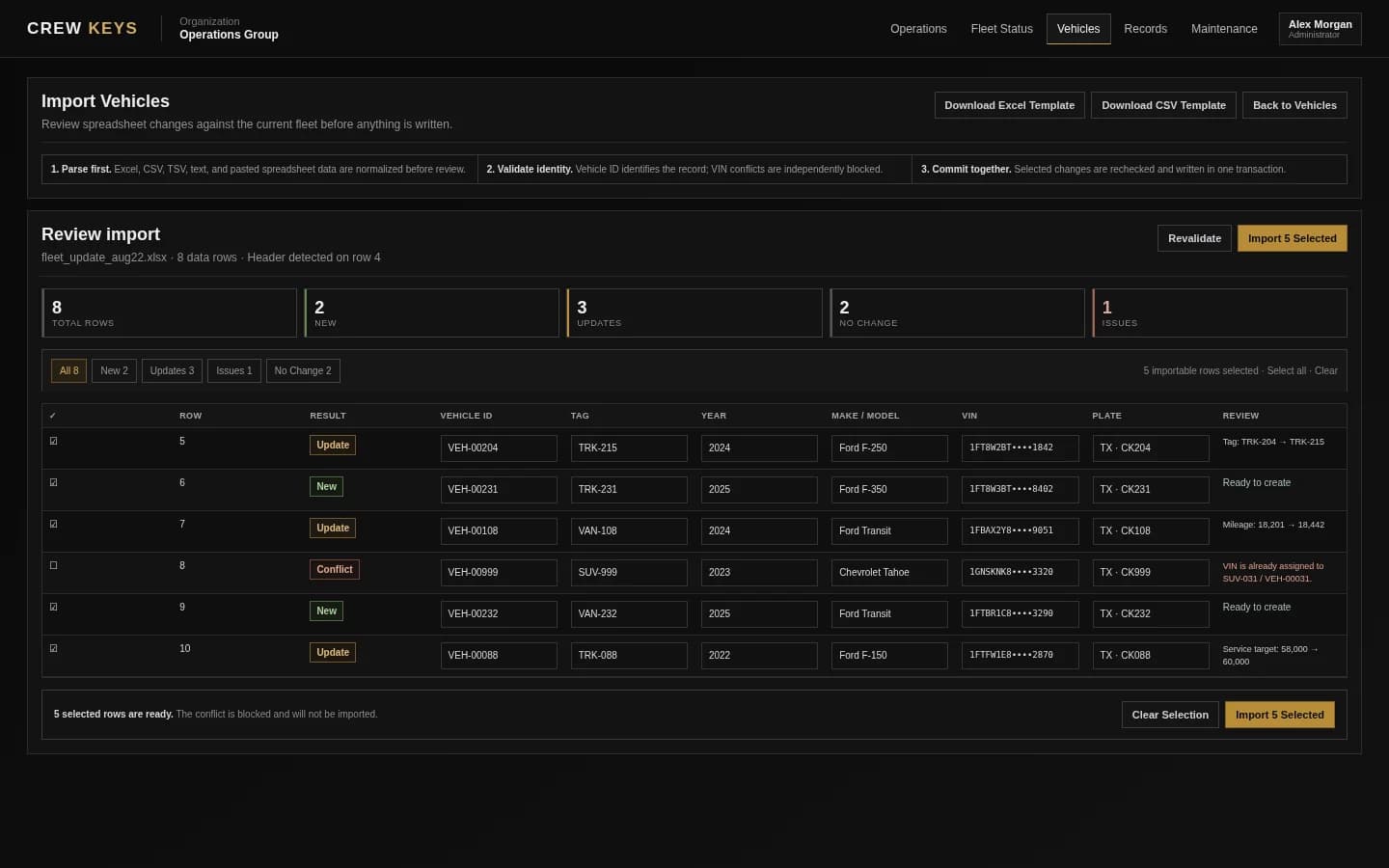
Supported input
Start with the format you already have.
The import workflow is designed around common administrative data rather than one rigid export format.
Five-stage import
Separate reading the file from changing the fleet.
- 01
Upload or paste the source
Read the spreadsheet and identify the actual header row, including Crew Keys exports that contain metadata above the table.
- 02
Normalize and validate fields
Standardize Vehicle ID, tag, VIN, make, model, plate, mileage, and other supplied values without treating omitted columns as blank updates.
- 03
Compare against the organization
Vehicle ID identifies the existing record. VIN is checked independently to ensure it is not owned by another vehicle in the same organization.
- 04
Review discrepancies
Classify each row as New, Update, No Change, Conflict, or Invalid. Allow corrections and selection before anything writes to the database.
- 05
Revalidate and commit one transaction
Lock and re-check reviewed vehicle versions, then commit all selected valid rows together. If a selected row fails, roll back the import.
Discrepancy matrix
Make the importer explain what it intends to do.
| State | What it means | Safe behavior |
|---|---|---|
| New | Vehicle ID does not already exist and the VIN is not assigned to another vehicle. | Create the vehicle after review. |
| Update | Vehicle ID already exists and one or more supplied fields differ. | Show exactly what will change before import. |
| No Change | The supplied values already match the current vehicle. | Skip the row rather than rewriting it. |
| VIN Conflict | The VIN is already assigned to a different vehicle in the same organization. | Block the row and require reconciliation. |
| Duplicate Vehicle ID | The same Vehicle ID appears more than once in the uploaded file. | Block the duplicated identity until the file is corrected. |
| Invalid | A required identity field is missing or a supplied value cannot be validated. | Fix the row before it can be selected for import. |
Important update rule
An omitted spreadsheet column should not erase existing vehicle data.
If a file contains only Vehicle ID, Tag, and VIN, the importer should preserve the existing make, model, plate, mileage, notes, and other fields. An explicitly supplied blank can be treated differently from a column that was never present.
Identity rule
Vehicle ID chooses the record; VIN verifies the identity does not collide.
Using ON DUPLICATE KEY UPDATE alone can allow the database to decide whether a duplicate Vehicle ID or duplicate VIN caused the match. Crew Keys checks those conditions explicitly so a VIN already assigned to another vehicle becomes a visible conflict instead of an unintended update.
Continue reading
Related Crew Keys workflows and resources.
See how imported vehicles appear in live fleet status and shared operations.
View resource →Vehicle sign-out sheet templateStart with a practical operational record if your fleet is still spreadsheet-based.
View resource →Vehicle checkout softwareMove from a clean vehicle directory into checkout and return accountability.
View resource →From template to workflow
Make the spreadsheet the staging area—not the source of silent database decisions.
Crew Keys validates vehicle identity first, shows discrepancies in a review table, and commits selected changes together only after the import is valid.