
Digital vehicle sign-out sheet
A digital vehicle sign-out sheet that knows what happens after the keys leave.
Crew Keys replaces the paper vehicle sign-out sheet with a live shared-fleet record. Operators can sign out a vehicle, capture mileage and fuel, complete the required inspection, report faults, and close the return without splitting the history across a binder and spreadsheet.
Current product UI
A sign-out record should still be useful after the keys are returned.
Crew Keys preserves checkout, PMCS, maintenance, operator, mileage, return, and fault context so the digital sign-out becomes searchable vehicle history instead of an isolated form.
Actual Crew Keys interface · fictional demonstration data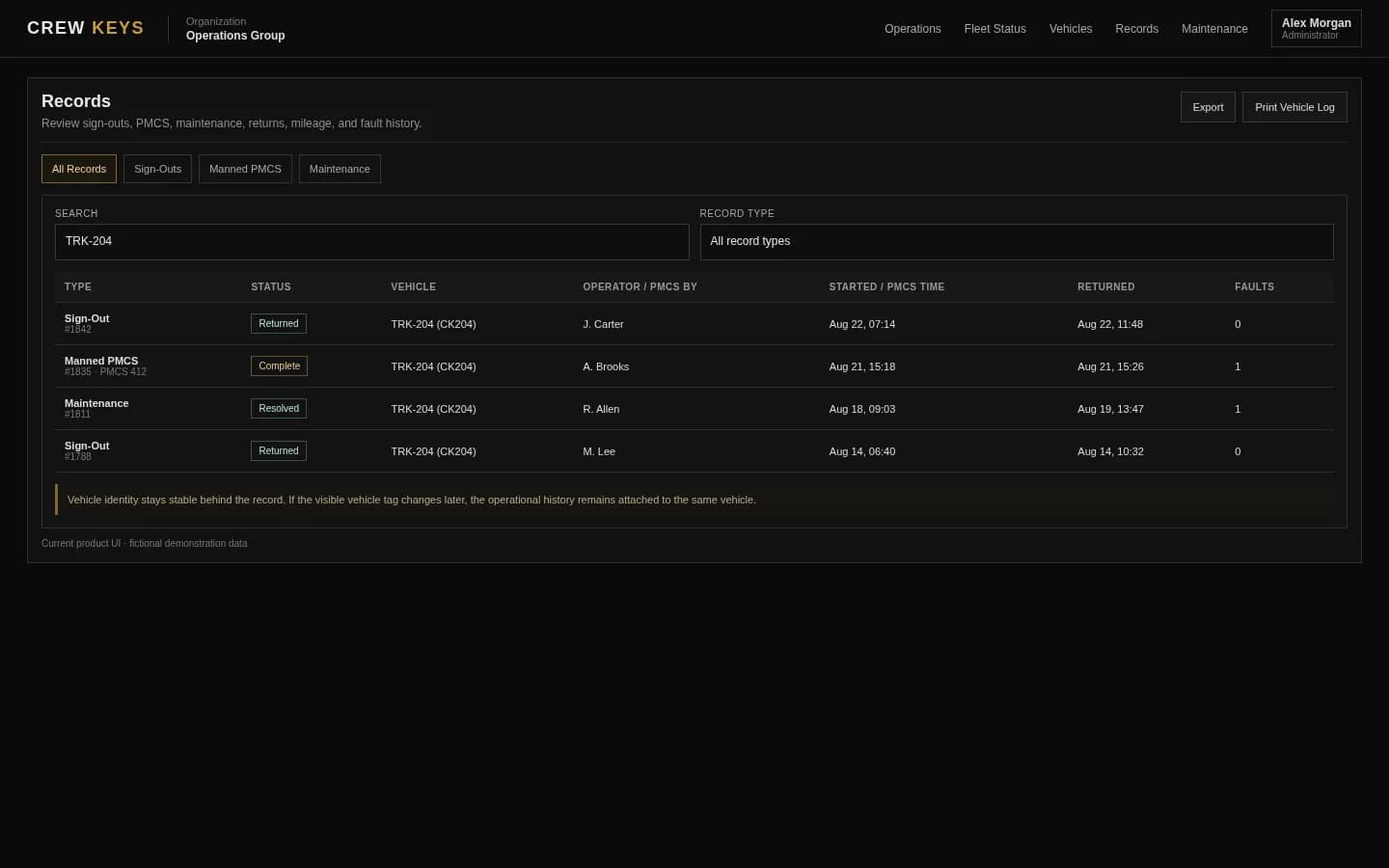
What it solves
What a useful vehicle sign-out record should tell you at a glance.
Replace the key log
Record the operator, vehicle, checkout time, purpose, destination, mileage, and fuel in a searchable digital record.
Know what is actually available
A checkout changes fleet availability, so the next operator can see whether a vehicle is open, out, pending workflow, or in maintenance.
Keep the return attached
Ending mileage, return fuel, parked location, notes, and new faults stay on the same record instead of becoming a second form.
Active Checkout
Operator, trip, mileage, fuel, and vehicle stay on one operational record.
| Vehicle | Operator | Out | Beg Miles | Fuel | Purpose | Destination |
|---|---|---|---|---|---|---|
| TRK-204 Ford F-250 | J. Carter | Aug 13, 18:42 | 64,118 | 3/4 | Equipment run | North Yard |
Example only · fictional checkout data
Workflow
Turn the old key-log sequence into one connected record.
- 01
Choose an available vehicle
Start from current fleet status rather than a key rack that cannot explain why a vehicle is unavailable.
- 02
Sign the vehicle out digitally
Capture who has it, why it is leaving, where it is going, and the starting mileage and fuel.
- 03
Complete inspection and fault reporting
Keep PMCS or inspection findings tied to the checkout and carry unresolved faults forward.
- 04
Return the vehicle and close the record
Capture ending mileage, fuel, location, notes, and faults before the vehicle returns to normal availability.
Completed Return
Ending mileage, fuel, parking location, notes, and faults close the record.
| Vehicle | Returned | End Miles | Fuel | Parked | Faults | Notes |
|---|---|---|---|---|---|---|
| SUV-022 Chevrolet Tahoe | Aug 13, 13:47 | 64,176 | 3/4 | Row B · Space 4 | 0 | No new issues |
Example only · fictional return data
Who it fits
For teams outgrowing binders, clipboards, and shared sign-out spreadsheets.
Small shared fleets replacing a paper vehicle sign-out binder or clipboard.
Departments where many operators share the same cars, trucks, vans, or specialty vehicles.
Teams that need more accountability than a spreadsheet but do not need GPS hardware or an enterprise telematics suite.
Vehicle Log
Window: Aug 1, 2026 - Aug 13, 2026
Total Records: 3
TRK-204 — Ford F-250
| Date | Beg Time | Beg Miles | End Time | End Miles | Purpose | Operator | Faults |
|---|---|---|---|---|---|---|---|
| 08/13/26 | 09:03 | 64,118 | 13:47 | 64,176 | Site visit | R. Allen | None |
| 08/11/26 | 07:28 | 64,022 | 12:10 | 64,096 | Equipment run | J. Carter | None |
Example only · fictional vehicle log data
Questions
Digital vehicle sign-out sheet questions.
What should a vehicle sign-out sheet include?
A useful record includes the vehicle, operator, checkout time, purpose or destination, starting mileage, fuel, return time, ending mileage, return fuel, parked location, notes, and any inspection or fault information required by the organization.
How is this different from a fillable PDF sign-out sheet?
Crew Keys changes the live fleet state when a vehicle is checked out and keeps inspection, fault, mileage, return, maintenance, and historical records connected instead of storing an isolated form.
Does a digital vehicle sign-out sheet require GPS tracking?
No. Crew Keys records operator-entered operational data and fleet workflow state without requiring telematics or GPS hardware.
Related workflows
Move from a sign-out sheet into the rest of the fleet workflow.
Use a practical field list with printable PDF and Excel templates before moving the process online.
View page →Vehicle checkout softwareUse a full checkout and return workflow instead of a standalone sign-out form.
View page →Shared vehicle managementKeep availability and accountability visible across pooled vehicles.
View page →Vehicle inspection appConnect sign-out activity to PMCS and vehicle fault records.
View page →Talk to Crew Keys
Have a fleet workflow you want to replace?
Tell us how your team checks vehicles out today, what you need to track, or where the current process breaks down. Your message goes directly to Crew Keys so we can respond with the right product or setup context.
One shared fleet record
Keep the sign-out sheet simple for operators and useful for administrators.
Capture custody, mileage, fuel, inspection, faults, and return details without creating separate records that have to be reconciled later.
Create an organization